Ever stared at a blank Miro flowchart board, wondering how to kickstart your threat modeling session? You’re not alone. In our decade+ of training security professionals, we’ve seen even experienced architects struggle with creating clear, effective Data Flow Diagrams (DFDs). That’s why we’re sharing something special: our professional Miro template that’s been battle-tested in hundreds of training sessions.
Why a Threat Modeling Data Flow Diagram Template?
Let’s face it – threat modeling can be intimidating. While STRIDE is powerful, getting started with your flowchart often feels like trying to build a house without a foundation. Our template provides that:
- Pre-built components that follow Data Flow Diagram best practices
- Clear trust boundary guidelines
- Practical explanations and a template enabling teams to threat model
The Power of Collaborative Threat Modeling with Miro
If you haven’t discovered Miro yet, you’re in for a treat. Think of it as your team’s virtual war room – an interactive whiteboard that transforms how teams collaborate. While many know Miro for its business templates, we’ve leveraged its robust feature set for security modeling. The platform combines the accessibility of whiteboards with the polish of professional design tools, making it perfect for threat modeling sessions.
What sets Miro apart is its real-time collaboration capabilities. Team members can join via email or link sharing, making it ideal for both remote and hybrid teams. The platform saves every board automatically, creating a valuable repository of your threat modeling work that you can reference and refine over time.
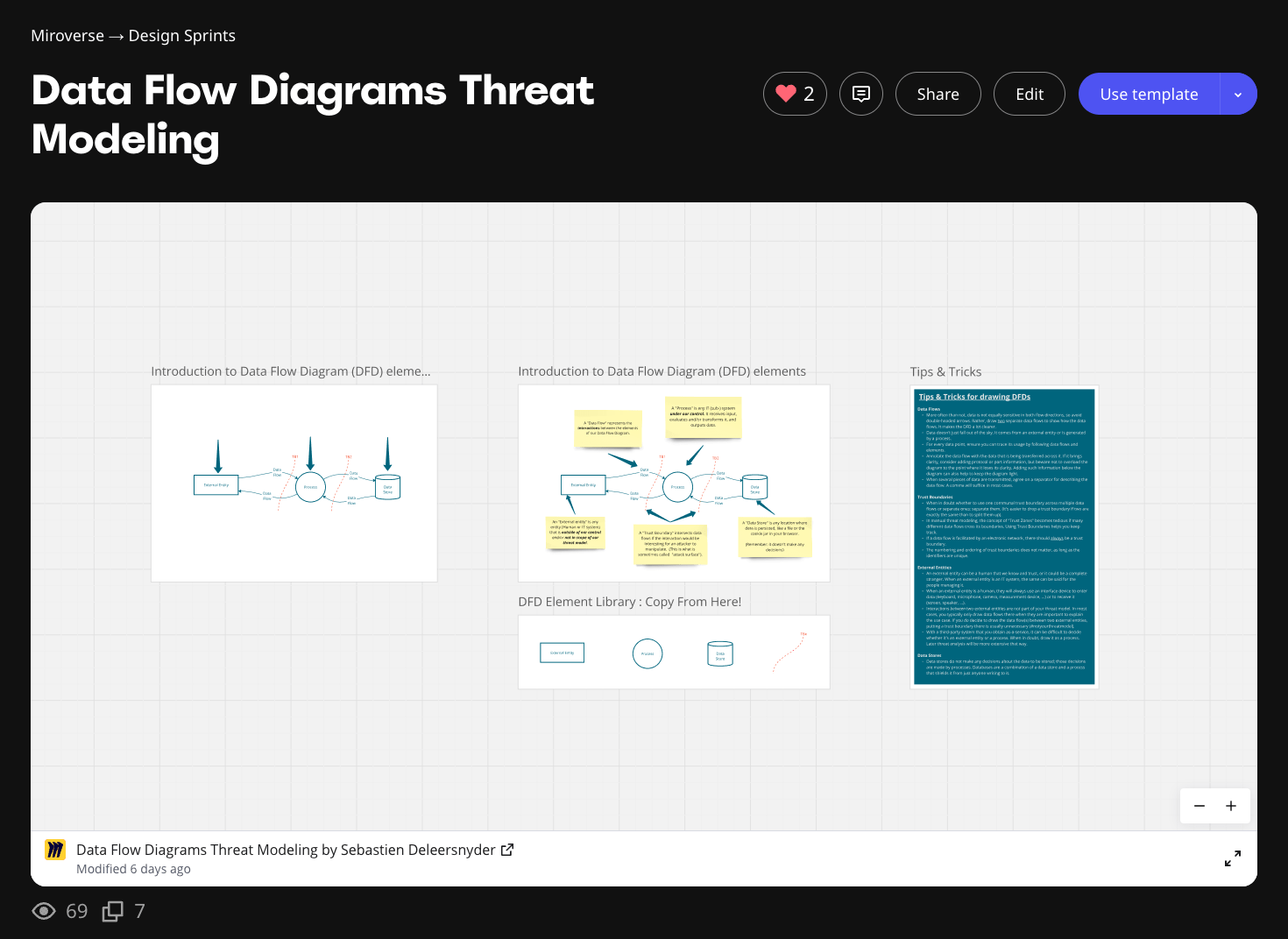
What's Inside the Miro Diagram Template?
This template is a visual tool that transforms complex threat modeling concepts into clear, actionable diagrams. We’ve distilled years of threat modeling expertise into a format that empowers organizations to kick-start their security analysis immediately. Whether you’re scaling your threat modeling program or just getting started, this template helps teams standardize their approach across projects and departments.
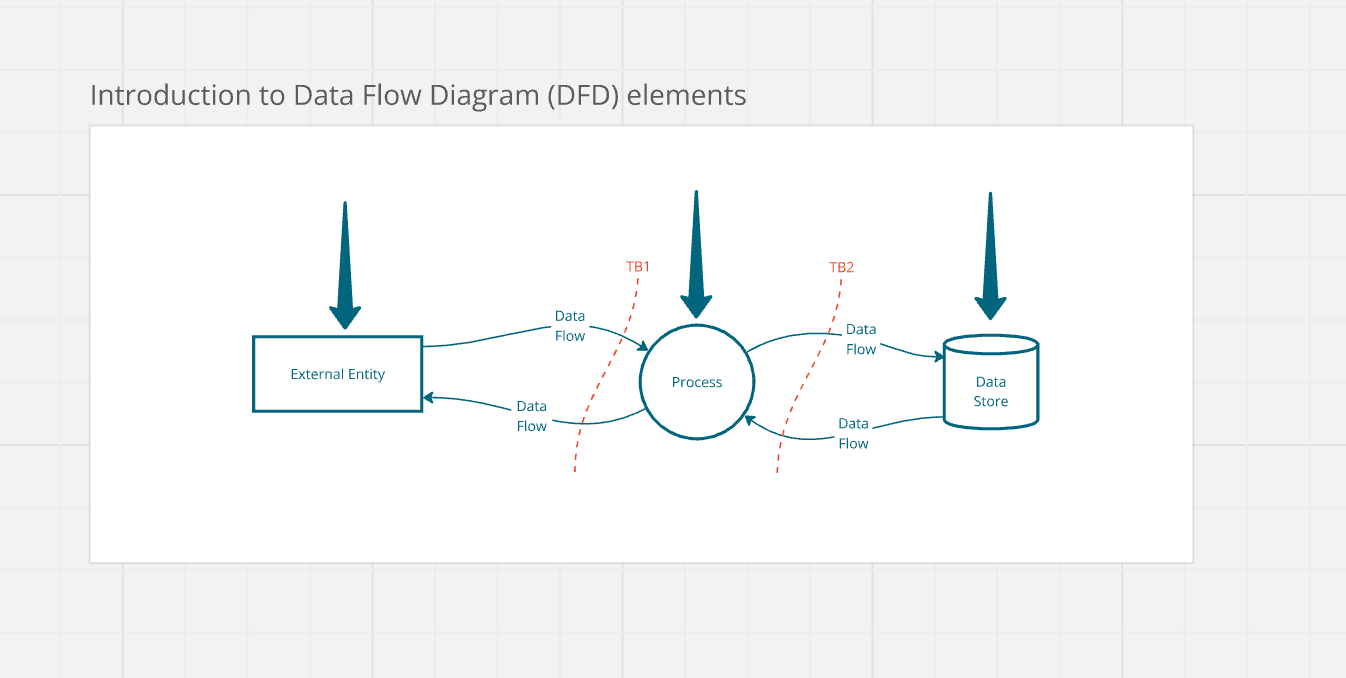
Core Components - Template in Miro
Pro Tips: Making Your Data Flow Diagrams Work Harder
Our Miro template provides a structured approach to threat modeling that transforms complex security concepts into actionable insights. As a powerful tool in your security arsenal, this template empowers organizations to create consistent, high-quality threat models while avoiding common pitfalls.
The template allows security teams to focus on what matters most – identifying and addressing security concerns – rather than getting bogged down in diagram mechanics. Let’s explore how to maximize the template’s capabilities:
Mastering Data Flows
Think of data flows as one-way streets, not highways. Our Miro diagram template provides clear visual cues for best practices:
- Single-direction arrows tell a clearer story than bi-directional ones
- Every data bit needs a clear origin (external entity or process)
- Data flows should be traceable from source to destination
Pro tip: When annotating flows, keep it clean:
- Use commas to separate multiple data elements
- Add protocol/port details below the diagram to maintain clarity
- Always ensure you can trace data usage across the system
Trust Boundaries: The Security Perimeter
The template empowers organizations with intuitive trust boundary components. Remember this golden rule: When in doubt, separate your boundaries. Here’s why:
- Merging boundaries later is easier than splitting them
- Network flows always need trust boundaries
- Use unique identifiers for boundaries (but don’t sweat the numbering)
External Entities: Managing the Unknown
As a powerful tool for system modeling, Miro makes it easy to represent external entities accurately. Consider:
- Human entities always interact through interface devices (keyboards, screens, etc.)
- Third-party services deserve special attention
- Inter-entity interactions usually stay outside your threat model (#notyourthreatmodel)
Data Stores: The Truth About Storage
The template provides a structured approach to representing data stores. Here’s what you need to know:
- They don’t make decisions about data
- What looks like a simple database is often a combo of store and process
- All security controls belong in the surrounding processes
Using these principles with our Miro template will help you create clear, actionable threat models that drive real security improvements. The template allows teams to:
- Standardize their approach across projects
- Collaborate effectively in real-time
- Document and track security decisions
- Scale threat modeling across the organization
Getting Started with the Data Flow Diagram Template is Dead Simple
- Visit our template in Miroverse
- Click “Copy Template” to add it to your workspace
- Start building your diagram using this template with our pre-made components
From Training Room to Your Team
This isn’t just another template – it’s the same framework we use in our professional threat modeling training. Our clients consistently tell us this approach helps them:
- Cut diagram creation time
- Improve team collaboration
- Standardize threat modeling across projects
Ready to Level Up Your Threat Modeling?
Remember: better threat models mean better security. Let's raise the bar together.