On July 25th, a data breach of the Tea app exposed more than 72,000 user selfies to anyone on the internet. This alone would’ve made headlines, but this incident is particularly serious from an Operational Security (OPSEC) perspective due to the presence of location metadata in the images.
The Tea app is a social platform where users post anonymous reviews of people they’ve dated or interacted with. It gained popularity quickly, particularly for its focus on gossip and ‘spilling tea’ on the dating pool. This app was only available to women, and in order to verify your gender, users were required to take a selfie during the signup process.
All of these selfies were stored on publicly accessible cloud storage. They were downloaded by an attacker and made public. Just a few hours later, this map was shared on the internet: An interactive map with the locations of thousands of women who had an account on the Tea app.
The drivers licenses leaked today from the tea app have been uploaded to a searchable map.... this may be the worst PII leak I've ever seen lol pic.twitter.com/qz2lzJreYa
— genddy (@ZTobias114838) July 25, 2025The thing that made this interactive map possible? Metadata.
Metadata leakage
In this blog post, we’re going to focus on the image metadata that was leaked. Metadata refers to information embedded within a file that isn’t immediately visible, like the GPS coordinates where a photo was taken, the device model, the software used to edit it, or even the name of the person who created the file. While often harmless, this data can become sensitive depending on the context. In the case of the Tea app, many of the uploaded selfies contained precise location data that users likely didn’t realize was being stored. When those images were exposed, so too were private details about where and when they were taken.
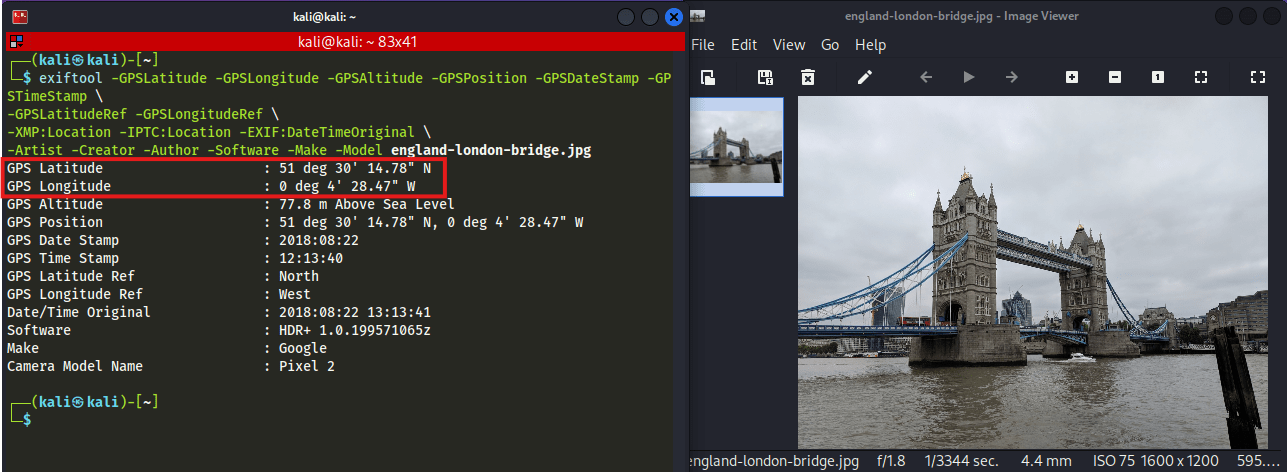
This Won’t Be the Last Time
What makes this incident especially compelling to us as security professionals is that we see this issue often. Uploaded files often include metadata: GPS coordinates, usernames, document authors, device info, and even software version numbers that sometimes map to known vulnerabilities. While most of that metadata is mundane or harmless, every now and then… it isn’t.
Checking for metadata on uploaded content is a standard part of our pentest checklist. In fact, this detection is automated by a Burp Suite plugin that automatically detects whether files retain metadata after upload and storage.
However, we often notice that this finding raises the same debate internally:
“Is this really a risk?”
We’d like to make the case that if you don’t need the metadata, then you should protect your users and strip it. Metadata risks are highly context-dependent. A timestamp or device name might seem trivial in most settings but in niche cases, this can expose patterns, reveal identities, or provide leverage for social engineering. And while most apps won’t see the same level of sensitivity as a whistleblower platform or a dating site for public figures, the key question is this: If the data isn’t needed, why store it at all?
Stripping metadata is a low-effort mitigation. It’s reducing unnecessary exposure by default, especially when many users don’t even know this information exists in their uploads. By proactively removing metadata, developers can avoid a whole category of privacy edge cases.
In short, if your application doesn’t require metadata for processing or display, it’s safer (and more respectful) to remove it during upload.
ASVS 5.0
This principle is now reflected in the latest version of the OWASP Application Security Verification Standard (ASVS) 5.0, specifically in requirement V14.2.8:
V14.2.8 – Verify that sensitive information is removed from the metadata of user-submitted files unless storage is consented to by the user.
It’s worth noting that this control is part of ASVS Level 3, which is intended for applications handling highly sensitive data or facing elevated security threats, such as systems used by governments, critical infrastructure, or at-risk user groups. Even if your application doesn’t formally target Level 3, adopting this control is a simple, proactive measure that aligns with the broader goals of user protection and privacy by design.
Closing Thoughts
In a development climate where apps are pushed to production fast (sometimes vibe-coded), security often lags behind usability. But breaches like the one at Tea serve as a reminder:
Strip metadata by default
Include it in your security testing
And maybe, just maybe, don’t take a selfie next to a fighter jet on an airstrip to sign up for a gossip app.
Rule Number One: Do not take a selfie to sign up for a gossip app while working on the flight line at a secret military base pic.twitter.com/221MIn6wTi
— Defense Insight (@Def_insight) July 26, 2025About the Author
Robbe Van Roey is a security consultant with 6 years of experience in the cybersecurity field. During this time, he has become an expert in web application and network penetration testing by responsibly disclosing vulnerabilities, engaging in bug bounty, competing in hacking competitions, and performing penetration tests. He has identified vulnerabilities in large organizations such as Google Chrome, Amazon, NVIDIA, Corsair and LastPass.